
Bots blocking (New Version)
Overview
Search engines, SEO tools, social media platforms, monitoring services, and other automated systems may visit your store without interacting with the consent banner like a real visitor.
The Known bots & crawlers option in the Bots & crawlers card hides the banner for automated visitors that Pandectes recognizes, and treats them as having given consent. Scripts run for them as if they had accepted, and nothing is recorded in your consent records.
By default, bots follow the regular flow, exactly like a human visitor.
Where to find the setting
- Open the Pandectes GDPR Compliance app.
- Go to Cookie banner.
- Open the Advanced tab.
- Find the Bots & crawlers card.
- Under Known bots & crawlers, enable Hide the banner and treat as consent given.
- Click See the list to review the user agent fragments that are treated as bots.
- Save.
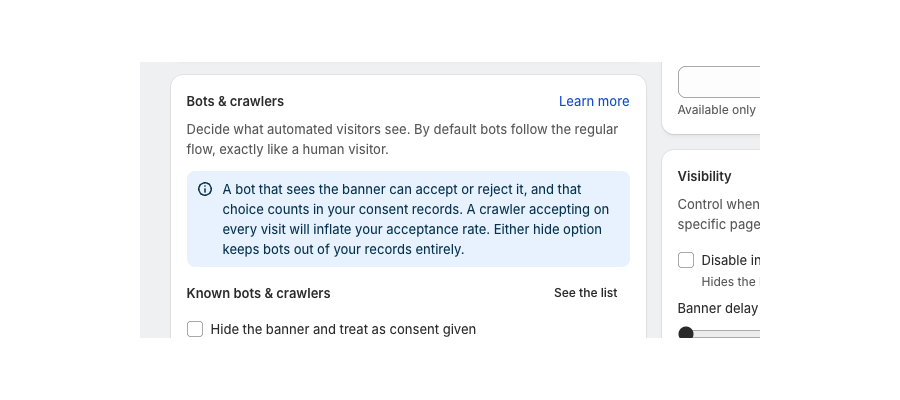
The same card has a Specific bots section for your own rules. Type a user agent fragment, press Enter, and add it to one of three lists: Show the banner, Hide and treat as consent given, or Hide and treat as consent denied. Matching ignores case and looks anywhere in the user agent. The most specific match wins, so "googlebot" overrides "bot". For more detail, see Bots & crawlers: control banner behavior and consent records.
How it works
When a visitor loads your store, Pandectes checks the browser user agent.
If the user agent matches a known bot, crawler, or automated tool, the banner is hidden for that session and the visit is treated as consent given.
This means:
- The banner is not displayed.
- The bot visit is not recorded in your consent records.
- The page can be rendered without banner interference.
Detected bot categories
Pandectes checks for known bots and crawler patterns, including the following categories.
Category | Examples |
|---|---|
Search engine bots | Googlebot, Googlebot-Mobile, Googlebot-Image, Google favicon, Mediapartners-Google, bingbot, msnbot, Yahoo! Slurp, YandexBot, Baiduspider, DuckDuckBot, Exabot, SeznamBot, Sogou, Qwantify |
SEO and analytics crawlers | AhrefsBot, SemrushBot, MJ12bot, BLEXBot, Lipperhey SEO Service, linkdex, Rogerbot, Ltx71, Sistrix Crawler, MegaIndex, GrapeshotCrawler, Seokicks-robot, xovibot, Ezooms, dotbot |
Social media bots | Facebookexternalhit, Twitterbot, Facebot, Pinterest, Tumblr, vkshare |
Archival and monitoring bots | archive.org_bot, ia_archiver, memorybot, changedetection, Pingability, Monitoring |
Common crawlers and libraries | wget, curl, Python-urllib, Java, Commons-HttpClient, httpunit, nutch, phpcrawl |
Other known bots and automated tools | Applebot, Coccoc, OrangeBot, Proximic, CrystalSemanticsBot, IntegroMedb, Toplistbot, WinHttpRequest, BnLAR, Adidxbot |
GDPR-related crawlers | Pandectes |
General bot patterns | spider, bot, crawler |
Why enable this option
Enable Hide the banner and treat as consent given under Known bots & crawlers if you want the banner to be suppressed for automated traffic.
This can help with:
- Cleaner consent data
Bot visits are less likely to appear as unresolved or non-interactive banner sessions.
- Better crawl rendering
Search engines and SEO tools can render page content without the banner covering or modifying the page view.
- More accurate reporting
Consent reports can stay focused on real visitor interactions instead of automated visits.
- Reduced unnecessary banner loading
The banner does not need to initialize for visitors that cannot provide meaningful consent.
Important notes
- This setting applies only to bots and crawlers that can be detected from their user agent.
- Some automated tools may use uncommon, custom, or disguised user agents and may not be detected.
- This option does not replace your consent model for real visitors.
- Real visitors still see the banner based on your banner visibility, region, and consent model settings.
- The detection list may be updated over time as known bot traffic changes.
Video tutorial
Summary
Use Known bots & crawlers to prevent the New Banner from running for known automated visitors. This helps keep crawler sessions separate from real visitor consent behavior and reduces banner interference for search engines, SEO tools, and monitoring services.
Updated on: 27/10/2026
Thank you!