
Consent Dialogs (New Version)
Overview
The Consent dialogs card defines how the cookie banner is presented to visitors on your Shopify store.
In the new banner version, two things are separate:
- Consent dialogs: which dialogs visitors see (the user interface).
- Consent model: how consent is interpreted and applied (the policy).
You can choose the interface of the banner independently from the consent policy applied to visitors.
Select the dialogs to enable
Go to Cookie banner > Layout and find the Consent dialogs card. Under Select the dialogs to enable, choose one of the options below.
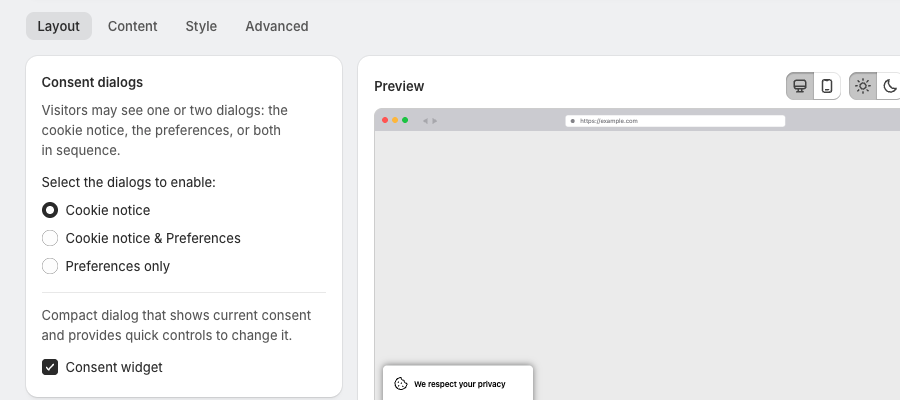
Cookie notice
A simple banner that tells visitors the site uses cookies and lets them confirm their choice with the available buttons.
- Minimal banner interface
- Focused on basic consent acknowledgement
- No cookie category controls on the banner
This option suits stores that prefer a simple notification-style banner.
Cookie notice & Preferences
A cookie notice together with access to cookie preferences. Visitors can:
- Accept or decline cookies
- Open the preferences dialog to manage cookie categories one by one
This is the standard consent dialog layout, with granular control over cookie categories.
Preferences only
The banner opens the preferences dialog straight away, so visitors manage cookie categories from the start. This suits stores that want visitors to configure consent immediately.
Consent widget
Below the dialog options, the Consent widget checkbox adds a compact dialog that shows current consent and gives visitors quick controls to change it. See How to enable and customize the consent widget (New Version).
Consent model
The consent model defines how the banner processes visitor consent and how cookies are activated based on visitor interaction and location. Set it in All settings > Consent model & regions.
Pandectes supports models such as:
- Strict opt-in (GDPR style)
- Standard opt-out (CCPA style)
- Auto-pilot geolocation mode
- Custom configuration for region-specific policies
Key points
- Consent dialogs define the user interface of the banner.
- Consent model defines the policy that controls cookie behavior.
- The two are configured separately in the new banner version: dialogs on the Layout tab, consent behavior in All settings > Consent model & regions.
Updated on: 27/10/2026
Thank you!