
How to enable and customize the Consent widget (New Version)
Overview
The consent widget replaces the simple Legacy re-open button. It can show current choices and open the notice or preferences again.
The Consent widget is a compact control that stays on the store after the visitor responds to the banner. Visitors can:
- Reopen the cookie notice or open the consent status
- Use Accept / Decline from the widget (if you show those buttons)
- Expand details such as consent ID and date (if enabled)
You can still add a Cookie settings menu link with #reopenBanner. See How to Re-open the Cookie Banner with a Menu Link (New Version).
Before you start
- The banner should be enabled (or enabled for admins while you test).
- Decide whether a click on the widget should open the Banner or Consent status.
Enable the widget
- Open Shopify Admin > Apps > Pandectes GDPR Compliance.
- Go to Cookie banner.
- Open the Layout tab.
- In Consent dialogs, turn on Consent widget.
- Scroll to the Consent widget card (Position and When clicked, it opens the) and the Consent status card (buttons, reverse order, details, animation).
- Save.
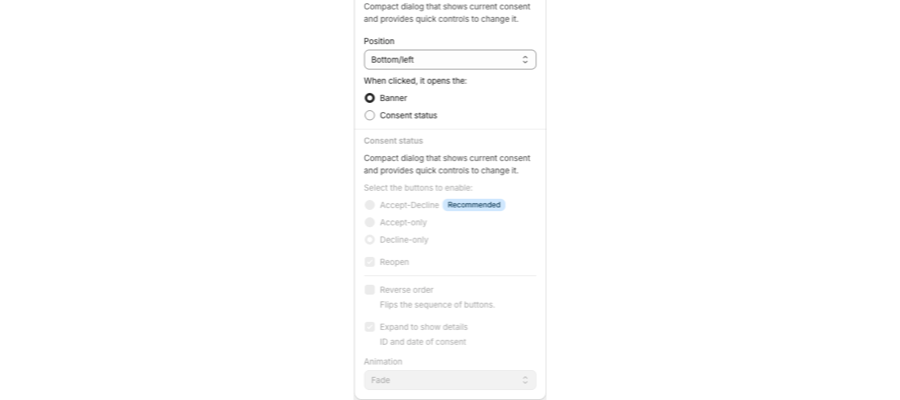
Layout options
Setting | What it does |
|---|---|
Position | Corner of the screen (for example Bottom/left). |
When clicked, it opens the | Banner or Consent status. |
Accept-Decline / Accept-only / Decline-only | Buttons on the Consent status dialog. Active when the widget opens Consent status. |
Reopen | Button to reopen the banner from the status dialog. |
Reverse order | Flips the sequence of the buttons. |
Expand to show details | Shows consent ID and date. |
Animation | How the status dialog appears. |
Style and content
- Style: upload a widget logo and match colors to the banner. See How to customize banner style, colors, logos, and buttons (New Version).
- Content: edit status dialog texts. See How to edit banner texts and links (New Version).
Preview
In the Banner preview, switch the preview target to Consent widget. Check Desktop and Mobile so the widget does not cover cart or chat buttons.
Related articles
- Customizing the layout of the banner (New Version)
- Custom styling with CSS
- Migration Guide: Recreating your Legacy Look in New Version
Updated on: 27/10/2026
Thank you!