
How to set product availability with metafields
Overview
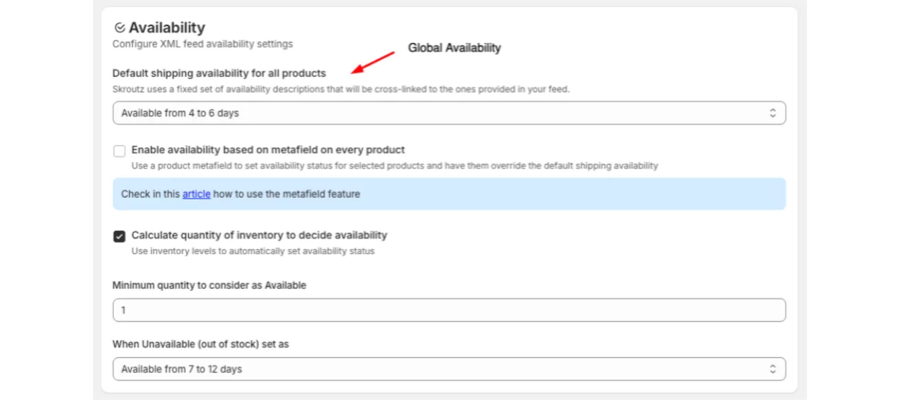
By default, every product in your Skroutz XML feed uses one global availability value, the Default shipping availability for all products setting in the app.
If some products ship faster or slower than the rest, you can enable a product metafield called Skroutz Availability. The app creates the metafield with four predefined Skroutz values, you set a value on the products you want, and the next generated feed uses that value instead of the global one.
Before you start
- Skroutz Connect is installed and connected to your Shopify store.
- You can open Products in your Shopify admin.
Step 1: Enable the feature in the app
- Open Skroutz Connect in your Shopify admin.
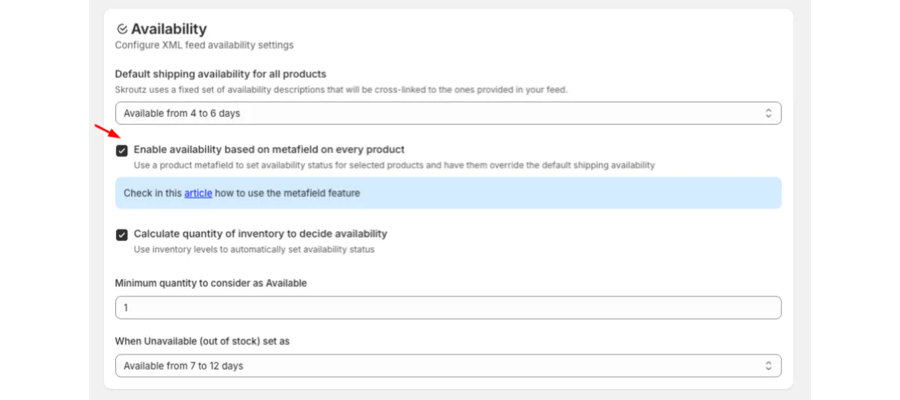
- Go to Settings > Availability.
- Check Enable availability based on metafield on every product.
- Select Save.
Step 2: Confirm the metafield is ready
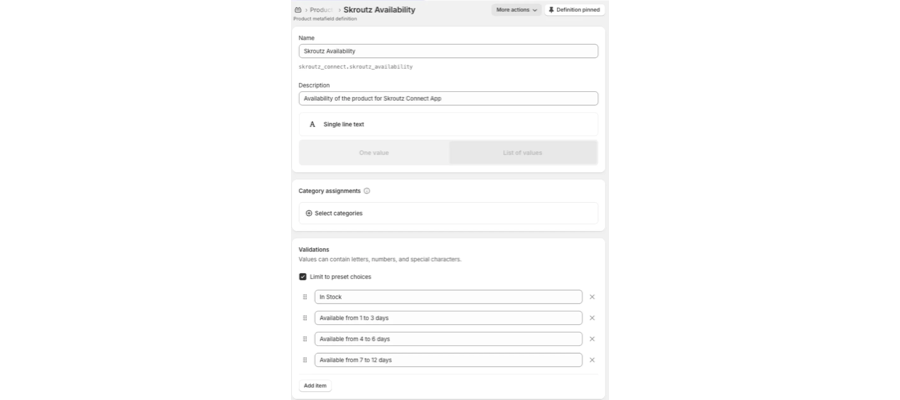
After you save, the app creates a product metafield definition automatically. You can find it in Shopify Admin > Settings > Custom data > Products, listed as Skroutz Availability (skroutz_connect.skroutz_availability).
The definition is limited to four preset choices:
- In Stock
- Available from 1 to 3 days
- Available from 4 to 6 days
- Available from 7 to 12 days
Step 3: Set availability on a product
- In your Shopify admin, go to Products and open a product.
- Scroll to the Metafields section.
- Find Skroutz Availability.
- Pick one of the four values from the dropdown.
- Select Save.
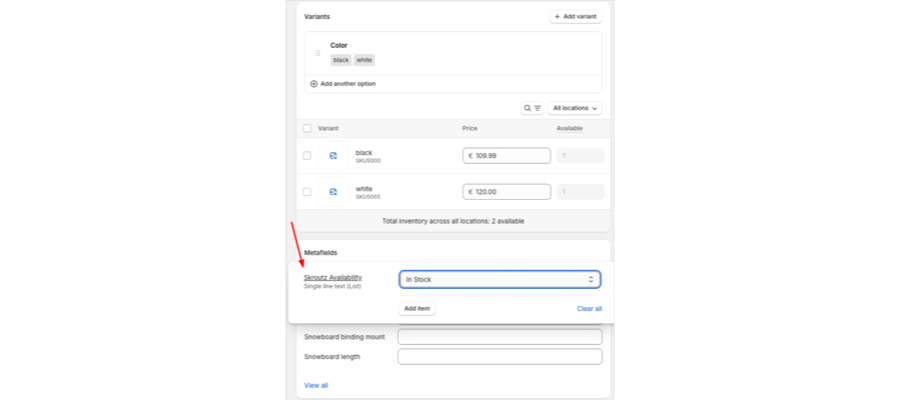
Repeat this for as many products as you need. Products you leave empty keep using the global availability.
Step 4: Regenerate the XML feed
- Go back to Skroutz Connect.
- Select Generate XML (or Regenerate feed).
- Wait for the confirmation that the new feed is ready.
How the override works
Product setup | Availability used in the feed |
|---|---|
The product has a Skroutz Availability value | That value |
The product has no value | The global Default shipping availability for all products setting |
Troubleshooting
The metafield does not appear on products
- Confirm the option is checked and that you selected Save in the app.
- Refresh the product page in Shopify.
- If it is still missing, uncheck the option, save, then check it again and save.
The XML did not change after I set values
- Confirm you saved the product in Shopify.
- Regenerate the XML in the app.
- Check that the product really has a value selected and not a blank field.
Only some products show the new availability
That is expected. Only products with the metafield set are overridden. The rest fall back to the global setting.
FAQ
Which availability values are supported?
The four values listed in Step 2. They are the ones Skroutz accepts, so the dropdown is limited to them.
Can I go back to a single availability for everything?
Yes. Uncheck Enable availability based on metafield on every product in Settings > Availability and save. The feed then uses only the global default.
Do I have to fill in every product?
No. Set the metafield only on the products that differ from your global default.
Related articles
Updated on: 28/09/2026
Thank you!