
How to uninstall or remove our application in Shopify
Follow our straightforward guide on how to uninstall or remove our application from your Shopify store. Ensure a clean and trouble-free removal process.
This article will show you how to uninstall our application entirely from your Shopify store. To uninstall an app, you can access the app's menu or go to the Apps section in Shopify and remove it from there.
Key features you might miss
Before you uninstall our app, remember that our app provides:
- Comprehensive GDPR/CCPA and other regulation compliance
- Advanced cookie management tools: If there’s anything we can help with, let us know!
Below, you can follow the 4 steps to uninstall the app. Otherwise, you can check out our video guide.
Having trouble?
If you faced any challenges, we’d love to help! Contact our support team for personalized assistance by clicking the chat icon on this page on the bottom right.
Steps
To uninstall our app in Shopify , check out the few steps below:
Step 1: App uninstall
Log in to your store with the store owner's account, then go to Settings in the bottom left. In Settings, open Apps.
A list of the apps installed in your store is on display. Find Pandectes GDPR, click the three dots next to it and click Uninstall.
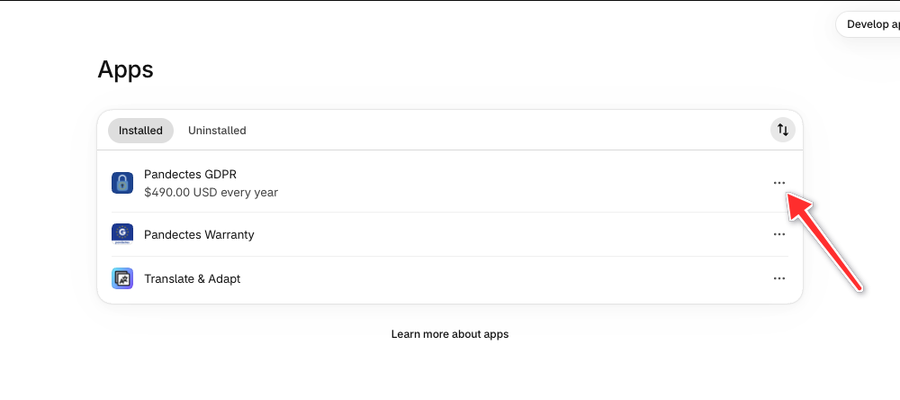
A window will pop up asking you to confirm your decision. Confirm the uninstall to remove the app.

Step 2: Removing app files from theme
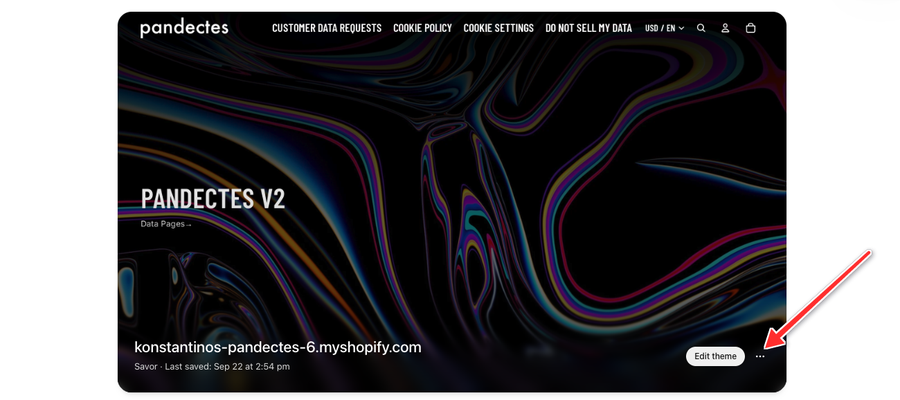
In the left menu, click Online Store. On your current theme, click the three dots next to Edit theme and click Edit code.
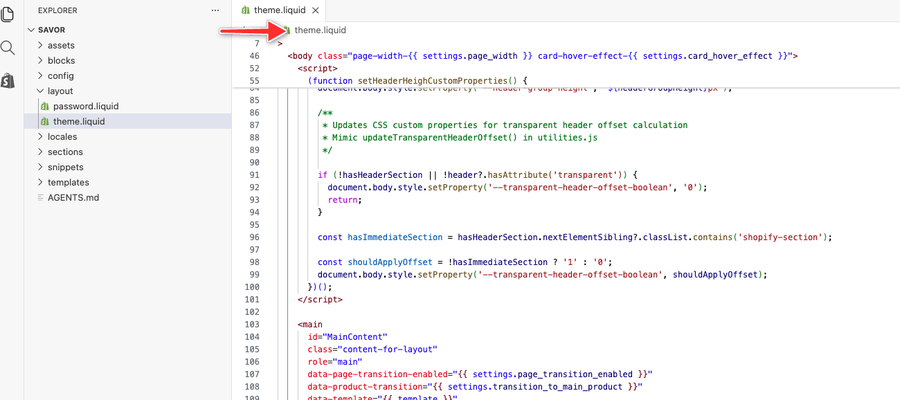
In the layout folder, open theme.liquid. The code is near the top of the file, inside the <head> section. Remove it and click Save.
Depending on the version of the application you have, you will need to delete one of the following codes:
<!-- Pandectes tag-rules: place always first on your head section --><script src="{{ 'pandectes-rules.min.js' | asset_url }}"></script>{% render "pandectes-rules" %}or<script src="{{ 'pandectes-rules.js' | file_url }}"></script>
Please repeat the same step if you have added this script to your password.liquid file.
The Pandectes Core app embed is removed automatically with the app. If you still see it listed under Online Store > Edit theme > App embeds, switch it off and click Save.
Step 3: Delete the Customer data requests page
If you have generated a Customer data requests (DSR) page from our application, you would need to delete it.
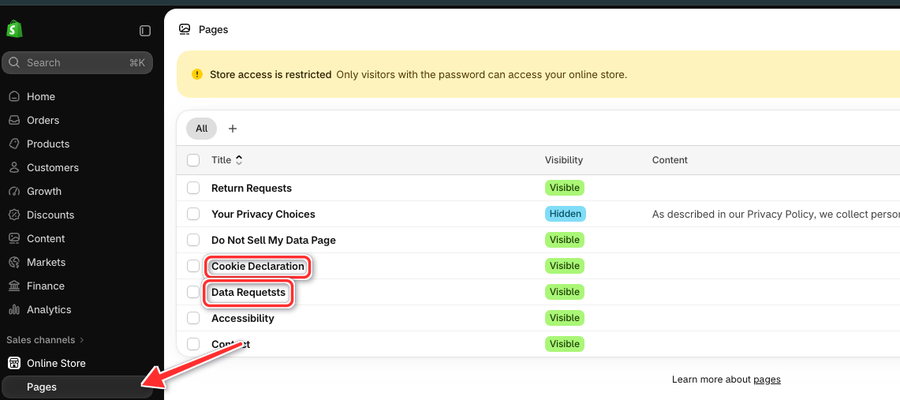
In your Shopify admin, go to Online Store > Pages. Select the checkbox next to the customer data requests page created by our app (for example Data Requests) and delete it.
Step 4: Delete the cookies declaration page
If you have added a cookie declaration page , you would need to remove it.
On the same Online Store > Pages list, select the checkbox next to the Cookie Declaration page created by our app and delete it.
We'd Love Your Feedback
We’re always striving to improve our app. Could you share why you decided to uninstall? Your feedback is valuable and helps us serve you better. Click here to provide your feedback.
Updated on: 03/11/2026
Thank you!