
How to show Do not sell or share my data on the banner (New Version)
Overview
It covers the in-banner opt-out toggle. The separate Do not sell my data storefront page is a different feature.
US state privacy laws can require a way to opt out of the sale or sharing of personal data. On the New Banner you can show a Do not sell or share my data control inside the consent dialogs.
Shopify decides which visitors are in a sale-of-data jurisdiction. Pandectes shows the toggle only when both are configured:
- Shopify Customer privacy sale-of-data / DNS regions
- Pandectes Enable toggle on Cookie banner > Layout
Visitors in regions Shopify does not treat as sale-of-data (for example many EU tests) will not see the toggle. That is expected.
Before you start
- Use the New Banner (not Legacy). Legacy does not include this Layout toggle.
- Know which US states you need to cover, or use Shopify’s automated customer privacy recommendations.
Step 1: Configure Shopify Customer privacy
- In Pandectes, open Cookie banner > Layout.
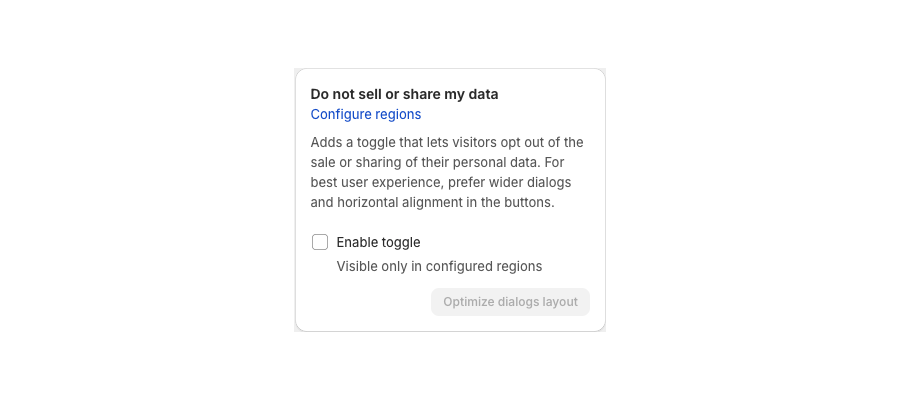
- Find Do not sell or share my data.
- Click Configure regions (opens Shopify Settings > Customer privacy, DNS / sale-of-data regions). You can also use All settings > Consent model & regions > Sale of data > Open customer privacy settings.
- Enable opt-out for the states you need, or use Shopify automated settings.
- Save in Shopify.
Without this step, the Pandectes toggle can be on while visitors never see it.
Step 2: Enable the toggle in Pandectes
- Stay on Cookie banner > Layout.
- Under Do not sell or share my data, select Enable toggle. The toggle is visible only in configured regions.
- Optional: click Optimize dialogs layout for wider dialogs and horizontal button alignment.
- Save.
Step 3: Edit the label
- Open the Content tab.
- Find Do not sell or share my data.
- Edit the Opt-out label if you want different wording.
- Save.
Optional: Dedicated opt-out page
You can still publish a Do not sell my data page from All settings > Do not sell my data (theme app block) and link it from the footer or privacy policy. That page is extra; it does not replace the in-banner toggle.
Verify
- Test from a US-covered context when you can (VPN, US market, or Shopify preview for that region).
- Confirm the toggle appears on the notice or preferences dialog.
- After opt-out, Shopify Customer Privacy
sale_of_datashould reflect the choice.
Related articles
- Consent Model & Regions (New Version)
- How to edit banner texts and links (New Version)
- How to setup the Do Not Sell My Data page
- How the do not sell my data feature works
- How Global Privacy Control (GPC) works
Updated on: 27/10/2026
Thank you!