
Basic or Plus: which Pandectes EU Warranty & GARAN plan do you need?
Overview
Pandectes EU Warranty & GARAN has two plans: Basic, which is free, and Plus, which is $9 per month with a 7-day free trial. You can pay for Plus monthly or annually. Annual saves 17%.
Both plans show the mandatory legal guarantee notice on your product pages and add it to your order confirmation email. Plus adds more languages, unlimited GARAN labels, bulk GARAN import and export, notice shapes, cart placement, checkout placement on Shopify Plus stores, a printable setup report, and a few tools for testing and styling. Many stores only need Basic.
Compare the plans
Feature | Basic ($0) | Plus ($9/month) |
|---|---|---|
Legal guarantee notice | Yes | Yes |
Live theme check | Yes | Yes |
Exclusion rules | Yes | Yes |
Styling options (text link color and underline) | Yes | Yes |
Legal notice and GARAN labels in order confirmation emails | Yes | Yes |
GARAN labels | Up to 10 products | Unlimited |
Bulk Garan label info import/export | No | Yes |
Languages | One language | All 24 EU languages, matched automatically |
Automated filters (hide on digital products, gift cards, services, B2B) | No | Yes |
Custom CSS styling | No | Yes |
Notice and GARAN templates (shapes) | No | Yes |
Cart placement | No | Yes |
Legal notice and GARAN labels in checkout | No | Yes, Shopify Plus stores only |
Admins-only testing mode | No | Yes |
Printable setup report (PDF) | No | Yes |
You need Plus if...
- You sell in more than one EU language. Basic serves a single language for the notice texts. See How to show the legal guarantee notice in your shoppers' languages.
- You offer a producer guarantee on more than 10 products. Basic stores GARAN data for up to 10 products.
- You want to import or export GARAN data in bulk. On Basic, the Import and Export buttons on the Garan label list page are greyed out.
- You want the notice in the cart as well as on the product page, on your cart page or in your cart drawer.
- You want to test before going live. Admins only mode shows the notice in the theme editor and theme preview only, not on the live storefront.
- You want to restyle the notice with custom CSS beyond the colour and underline options.
- You want a different shape than the text link: Row, Button, Pill or Box, with icons and colors. See How to choose a shape, icon and colors for the legal guarantee notice.
- You are on Shopify Plus and want the notice in checkout. See How to show the legal guarantee notice in checkout (Shopify Plus).
- You want a dated record of your setup. The Setup report can be saved as a PDF on Plus. See How to print or save the setup report as a PDF.
- You want automated filters that hide the notice automatically on digital products, gift cards, services, and B2B / wholesale products.
Basic is enough if...
- You sell in one language.
- You do not offer a producer guarantee, or you offer one on 10 products or fewer.
- You only need the mandatory legal guarantee notice on your product pages and in your order confirmation email. See How to add the legal guarantee notice to your order confirmation email.
In that case Basic covers what you need. You can still exclude products manually with Exclude filters on the Visibility options page.
Upgrade to Plus
- Open Shopify Admin > Apps > Pandectes EU Warranty & GARAN.
- Open Plan in the app menu. You can also select View plans wherever a Plus feature is locked.
- Choose Monthly or Annual at the top. Annual saves 17%.
- Under Plus, start the 7-day free trial.
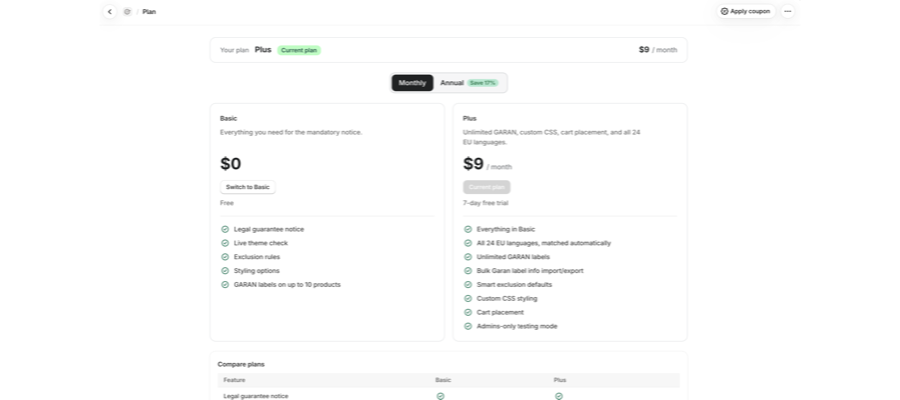
If you have a coupon, select Apply coupon at the top right of the Plan page, enter the Coupon code and select Apply. The page then shows a Coupon applied card, and the discount is used automatically when you subscribe. The Compare plans table below the plans lists every feature side by side.
If the trial ends without a subscription, your store goes back to Basic and the Plus features lock again. To move back yourself, select Switch to Basic.
Related articles
- How to install and set up Pandectes EU Warranty & GARAN
- How to configure the legal guarantee notice
- How to show the legal guarantee notice in the cart
- How to add GARAN labels to your products
- How to hide the legal guarantee notice on gift cards, digital goods and other products
Updated on: 27/10/2026
Thank you!