
The EU legal guarantee notice and GARAN label explained
Overview
From 27 September 2026, sellers of physical consumer goods to shoppers in the EU must show a harmonised legal guarantee notice on their product pages. The design and the content of that notice are fixed by Commission Implementing Regulation (EU) 2025/1960. A second, optional visual called the GARAN label covers a producer's commercial guarantee of durability.
Pandectes EU Warranty & GARAN adds both to your Shopify storefront. It uploads the official artwork in every EU language, renders it under Add to cart, and hides it on the products where it does not belong.
The two visuals are not the same thing
Merchants mix these up constantly, so it is worth being precise.
Legal guarantee notice | GARAN label | |
|---|---|---|
Status | Mandatory | Voluntary |
Who it concerns | every seller of physical B2C goods to EU shoppers | only products where the producer offers a free commercial guarantee of durability |
Conditions | none, it applies by default | the guarantee must be free of charge, cover the whole product, and last more than 2 years |
What it is about | the statutory minimum 2-year legal guarantee of conformity | the producer's own durability guarantee |
Artwork | fixed and official | fixed and official, with years, brand, and model filled in |
The legal guarantee of conformity already exists under Directive (EU) 2019/771. What changes in 2026 is that it has to be communicated with a specific harmonised visual, in a specific place, in the shopper's language.
What the regulation requires online
Four points drive almost every question we get.
- Online shops must use the colour version. The black and white artwork is only allowed for sales that are not online.
- The artwork is used unchanged. It may not be redrawn, recoloured, re-typeset, or cropped. Your own version of the notice does not satisfy the requirement.
- It must be in the shopper's language. The regulation covers all 24 official EU languages.
- Nested display is allowed for GARAN online. The label may sit behind an expandable control instead of being fully open on load.
This is why the app uploads official images for 24 languages and keeps the notice off until every one of them finishes processing. A partially uploaded set would mean some shoppers see the notice and others do not.
Where the notice appears
On the product page, directly under Add to cart, in one of three display modes you choose:
- Always visible: the artwork renders inline as soon as the page loads.
- Collapsed: a Legal guarantee summary that expands to the artwork.
- As a popup: a Legal guarantee trigger that opens the artwork in a dialog.
On the Plus plan you can also place the notice in the cart: How to show the legal guarantee notice in the cart.
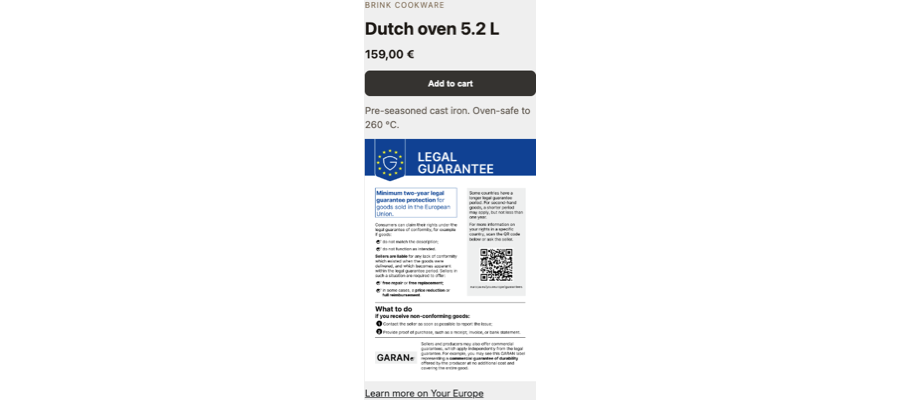
What the app handles for you
- Uploads and maintains the official colour artwork for 24 EU languages.
- Renders the notice on every product template where you add the theme block.
- Matches the artwork to the shopper's language automatically, and the labels too once you add their language. See How to show the legal guarantee notice in your shoppers' languages.
- Hides the notice on products where it should not appear, such as gift cards, digital goods, services, and B2B lines. You control this on the Visibility options page.
- Stores GARAN years, brand, and model per product and renders the GARAN label where a qualifying producer guarantee exists.
- Adds the notice, and the GARAN label for each order line that has GARAN data, to your order confirmation email. See How to add the legal guarantee notice to your order confirmation email.
- On Shopify Plus stores, shows the notice in checkout. See How to show the legal guarantee notice in checkout (Shopify Plus).
- Produces a dated setup report you can save as a PDF. See How to print or save the setup report as a PDF.
Plans
Basic ($0) | Plus ($9 per month) | |
|---|---|---|
Legal guarantee notice | Yes | Yes |
Product page placement | Yes | Yes |
Live theme check | Yes | Yes |
Exclusion rules | Yes | Yes |
Styling options (text link color and underline) | Yes | Yes |
Legal notice and GARAN labels in order confirmation emails | Yes | Yes |
GARAN labels | Up to 10 products | Unlimited |
Bulk GARAN import and export | No | Yes |
Languages | One language | All 24 EU languages, matched automatically |
Automated filters | No | Yes |
Custom CSS | No | Yes |
Notice shapes (Row, Button, Pill, Box) | No | Yes |
Cart placement (cart page and cart drawer) | No | Yes |
Legal notice and GARAN labels in checkout | No | Yes, Shopify Plus stores only |
Admins-only testing mode | No | Yes |
Printable setup report (PDF) | No | Yes |
Basic covers the mandatory notice completely. Plus makes sense when you sell into more than one EU language market, when more than 10 products qualify for GARAN, or when you want the notice in the cart as well. See Basic or Plus: which Pandectes EU Warranty & GARAN plan do you need?.
Should you turn GARAN on?
Only if the producer of that product offers a commercial guarantee of durability that is free of charge, covers the whole product, and runs for more than two years. That is the producer's commitment, not the retailer's, and Pandectes cannot determine it for you. If no such guarantee exists, leave GARAN off and show the legal guarantee notice alone.
Related articles
- How to install and set up Pandectes EU Warranty & GARAN
- How to configure the legal guarantee notice
- How to add GARAN labels to your products
- How to hide the legal guarantee notice on gift cards, digital goods and other products
- Why the legal guarantee notice is not showing on a product page
Updated on: 27/10/2026
Thank you!