
How to configure the legal guarantee notice
Overview
How the notice looks lives on one page: Shopify Admin > Apps > Pandectes EU Warranty & GARAN > Notice & label. It is a single scrolling page with no tabs, and a live preview sits on the right. The texts and languages are on their own page, Texts & languages.
Where the notice shows (EU markets, excluded products) is controlled separately, on the Visibility options page.
Before you start
Finish the install first, including the artwork sync. See How to install and set up Pandectes EU Warranty & GARAN.
Turn the notice on or off
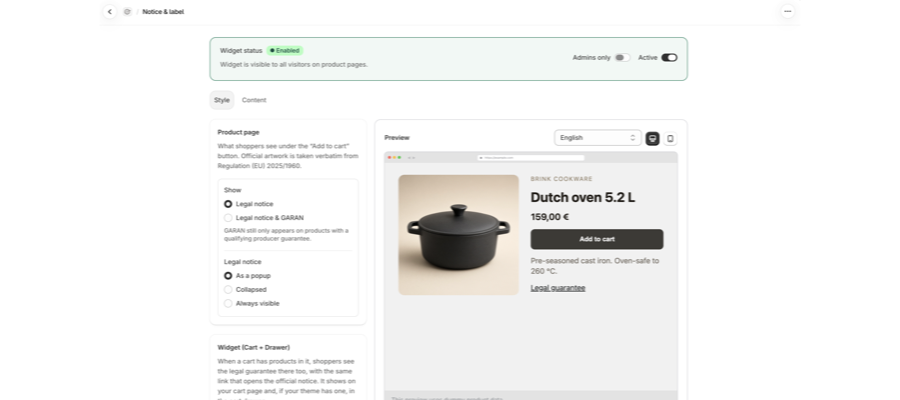
The Widget status card at the top of Notice & label shows an Enabled badge and reads "Widget is visible to all visitors on product pages." when everything is running. On the right of that card:
- Active: the master switch. Off means no shopper sees the notice.
- Admins only
Plus: a testing mode.
The preview
The Preview card on the right follows you down the page. Use the switch at the top of the card to change the page you preview: Product page, Cart drawer (a Plus feature), and, on Shopify Plus stores, Checkout. The desktop and mobile buttons switch the layout. The preview uses sample product data.
Product page
This card controls what shoppers see under the Add to cart button. The official artwork is taken verbatim from Regulation (EU) 2025/1960.
Show:
- Legal notice: the mandatory notice only.
- Legal notice & GARAN: adds the GARAN label. GARAN still only appears on products with a qualifying producer guarantee.
Legal notice:
Option | What the shopper sees |
|---|---|
As a popup | A Legal guarantee trigger that opens the artwork in a dialog. |
Collapsed | A Legal guarantee summary that expands to the artwork. |
Always visible | The artwork rendered inline under Add to cart on page load. |
GARAN (when you show GARAN): Collapsed shows the official compact mark and shoppers can open the full label. Always visible keeps the complete colour label on show.
In Collapsed and As a popup the artwork image is only requested once a shopper opens the disclosure. That is intended. If you want the artwork visible without a click, choose Always visible.
Design
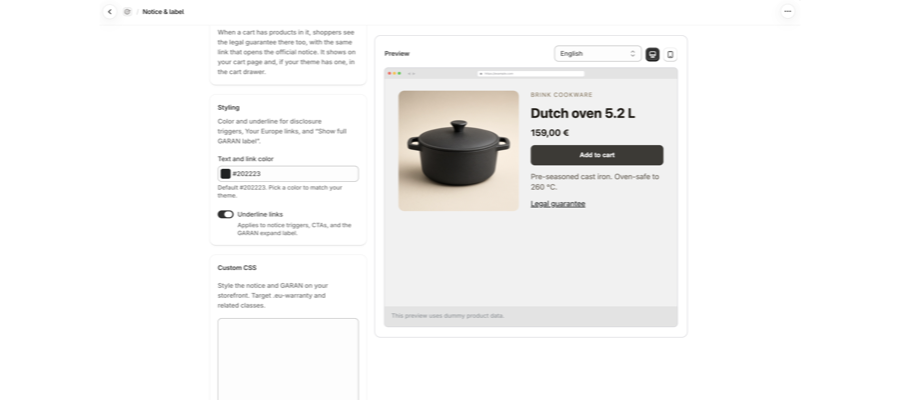
The Design card sets how the legal guarantee and GARAN label appear under Add to cart. Pick a Shape: Text link, Row, Button, Pill or Box. Basic includes Text link. The other shapes, with their Strength, Icon, Width, Corners, Font and color settings, are part of Plus. Full steps: How to choose a shape, icon and colors for the legal guarantee notice.
With Text link, the Details card has two controls:
Control | Effect |
|---|---|
Text and link color | Colour of "Legal guarantee", the Your Europe links and "Show full GARAN label". Default |
Underline links | Underlines those links. |
Widget (Cart + Drawer)
When a cart has products in it, shoppers see the legal guarantee there too, with the same link that opens the official notice. It shows on your cart page and, if your theme has one, in the cart drawer. This is a Plus feature. Placing it is done from the Dashboard: How to show the legal guarantee notice in the cart.
Advanced
Select Advanced at the bottom of the page to open two cards:
- Placement: for older themes that cannot add the notice from the theme editor. Enter a CSS selector for the Product page selector (and, on Plus, the Cart drawer selector), or leave it empty and paste the code snippet into your theme.
- Custom CSS
Plus: style the notice and GARAN on your storefront. Target.eu-warrantyand related classes.
Legal Notice in checkout (Shopify Plus stores)
On Shopify Plus stores, Notice & label also has a Legal Notice in checkout section. See How to show the legal guarantee notice in checkout (Shopify Plus). Other stores do not see this section.
Texts and languages
Open Texts & languages from the app menu to choose the languages shoppers see and to edit the texts.
Localization
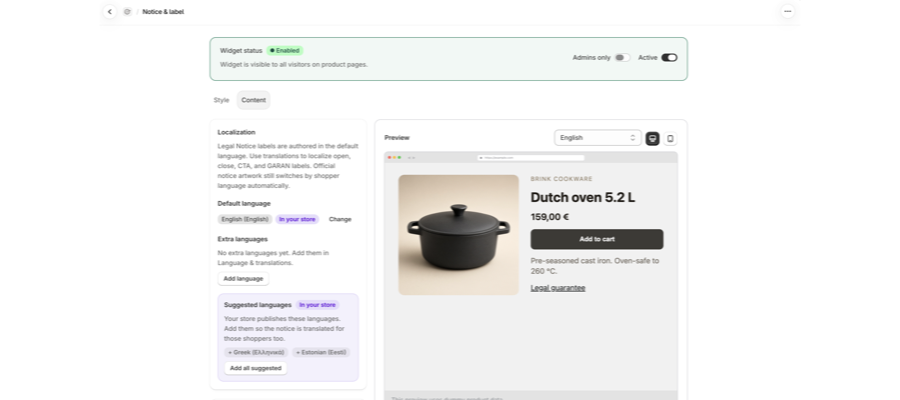
Legal Notice labels are written in your default language. Official notice artwork still switches by shopper language automatically.
- Default language: the language the texts are written in. Select Change to pick another one.
- Extra languages: Basic includes one language. Plus lets you add more with Add language, or Add all suggested for the languages your store already publishes.
- Language detection
Plus: From store locale (the language your store is shown in) or From browser preferences (the shopper's browser language, if you have added it).
Full steps: How to show the legal guarantee notice in your shoppers' languages.
Texts
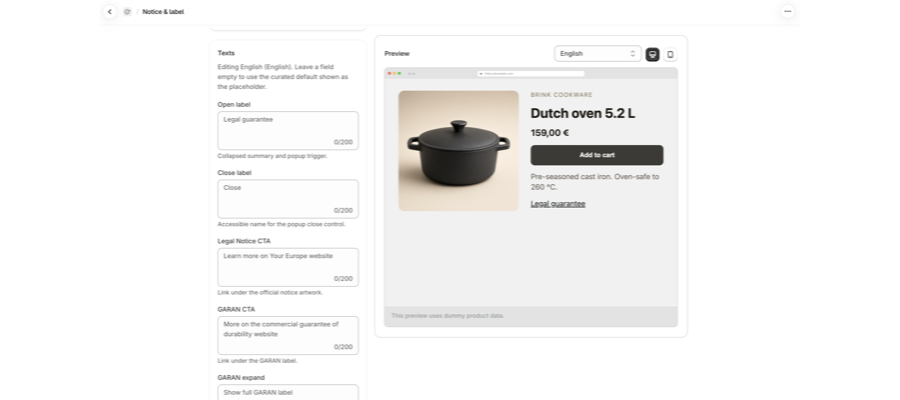
The Texts card starts with the language you are editing, for example Editing English (English). Each field is capped at 200 characters. Leave a field empty to use our standard text, shown in grey as the placeholder. The standard texts are already translated per language, so blank is the right answer for most stores.
Field | Default | Where it appears |
|---|---|---|
Link to open the notice | Legal guarantee | The collapsed summary and the popup trigger. |
Close button | Close | Read aloud by screen readers for the button that closes the notice. |
Your Europe link (notice) | Learn more on Your Europe website | The link under the official notice image. |
Your Europe link (GARAN) | More on the commercial guarantee of durability website | The link under the GARAN label. |
Show full GARAN label | Show full GARAN label | What shoppers click to see the full GARAN label. |
Hide full GARAN label | Hide full GARAN label | Shown instead once the full GARAN label is open. |
Guarantee details | Guarantee details | Link text when a product's guarantee is a web page. |
Notice image description | Legal guarantee of conformity | Read aloud by screen readers instead of the notice image. |
Button on the checkout card | View | Shopify Plus stores only. The button on the Legal Notice card in checkout, up to 30 characters. |
Control where the notice shows
Open Visibility options from the app menu. It holds:
- Markets: EU markets only hides the notice outside the EU. Leave it off to show the notice in all markets.
- Draft & password-protected products: always excluded, marked Automatic.
- Automated filters
Plus: hide the notice automatically on digital products, gift cards, services, and B2B / wholesale products. - Exclude filters: your own rules by Tag, Product type, Vendor, or Collection.
- A table of excluded products, with a Reason column naming the rule that hid each one.
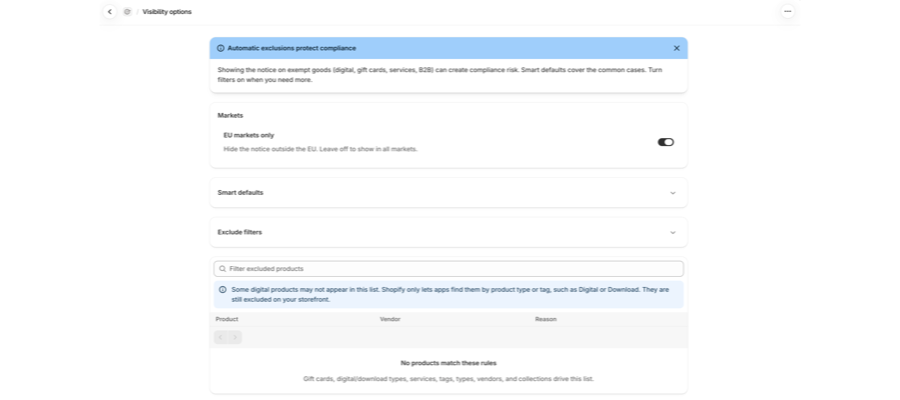
Full steps: How to hide the legal guarantee notice on gift cards, digital goods and other products.
Verify on your storefront
- Open a product page in a private window.
- Look under Add to cart.
- In Always visible mode you should see the artwork. In the other two modes you should see the Legal guarantee trigger, and the artwork after you open it.
Related articles
- How to install and set up Pandectes EU Warranty & GARAN
- How to add GARAN labels to your products
- How to choose a shape, icon and colors for the legal guarantee notice
- How to show the legal guarantee notice in the cart
- How to show the legal guarantee notice in checkout (Shopify Plus)
- How to show the legal guarantee notice in your shoppers' languages
- Why the legal guarantee notice is not showing on a product page
Updated on: 27/10/2026
Thank you!